> ## Documentation Index
> Fetch the complete documentation index at: https://docs.shovels.ai/llms.txt
> Use this file to discover all available pages before exploring further.
# Introducing the Shovels API
> Comprehensive guide to the Shovels REST API, including authentication, pagination, error handling, and getting started information.
The Shovels REST API makes it easy for technology developers in the property, climate, and construction industries to access detailed information about building permits, contractors and construction activity. Our API is designed to be intuitive and fast. We look forward to seeing what you build with it: [let us know](https://docs.google.com/forms/d/e/1FAIpQLSfs5Z6NZyPdnRpL96bMduH95OhfFZgLz9Hkc0-Y7pukUxSLxQ/viewform) and we'll check it out!
## Key Features
The API offers access to two primary objects: **Permits** and **Contractors**.
* **Permits**: Official documents issued by city or county authorities required before commencing construction or alterations to a building.
* **Contractors**: Skilled professionals in the building trades who undertake permitted construction projects on various properties.
And some additional resources:
* **Lists**: Endpoints for predefined values like tags and property types for query parameters.
* **Addresses**: Endpoint for searching and resolving valid US addresses.
* **Meta**: Endpoints for metadata about the API and the data behind it.
## Use Cases
The use cases are endless, but the most common we see today are:
* **Sales and Marketing**: Generate lead lists with precision, at scale.
* **Development**: Build direct product integrations to bring Shovels data into your own applications.
* **Market Research**: Programmatically return and export Shovels data into your own tools, dashboards, and reports.
## Getting Started
To begin using the API, please contact our sales team at [sales@shovels.ai](mailto:sales@shovels.ai) or grab a [free API key](https://app.shovels.ai/create-account/).
The free API key includes 250 requests. If you use them all and need more, please reach out to [sales@shovels.ai](mailto:sales@shovels.ai) or call us at [1-800-511-7457](tel:+18005117457).
### API Key
For any API request, you'll need to include your API key. This is available in your [Profile Settings > API Key](https://app.shovels.ai/profile-settings).
### API Free Trial
We want you to be able to adequately test our API before making your decision. Completely separate from the Shovels Online web app trial, there is a free trial of the API key as well.
API Key free trials include **250 free requests** with no time limit or credit card required. Each API call counts as 1 request, regardless of how many records are returned—so a search returning 100 permits still counts as just 1 request.
**Free trial vs. paid plans:** The free trial is request-based (250 requests, each API call = 1 request). Paid plans use a credit system where each record returned counts against your credits. See [How do API credits work?](/docs/knowledge-base/api/basics/request-counts) for details on the paid credit system.
If you use all your free trial requests and need more, please reach out to [Sales](mailto:sales@shovels.ai) for an extension.
## Authentication
Authentication is required for any API request that you make, whether it's in the API Playground or in your own scripts.
Our API uses a straightforward header-based authentication method: X-API-Key: YOUR\_API\_KEY\_HERE.
Here's an example request:
```bash theme={null}
curl -X GET "https://api.shovels.ai/v2/meta/release" \
-H "X-API-Key: YOUR_API_KEY_HERE"
```
If you have any issues with your API key, credit limits, or other authentication issues, please reach out to [Support](mailto:support@shovels.ai).
### Acceptable Use Policy
We expect that you will respect our platform and avoid frivolous requests. We are constantly monitoring usage and will enforce rate limits on an individual basis as needed.
If you feel that your API key is being rate limited, please reach out to [Support](mailto:support@shovels.ai) for clarification.
## API Details
### Quick Overview
A few quick details about our API:
| Type | Description |
| ------------------ | --------------------------------------------------------------- |
| **SSL Only** | We require that all requests be made over SSL. |
| **UTF-8 Encoding** | We use UTF-8 encoding for all requests and responses. |
| **Method** | HTTP GET for all read calls. |
| **Date Format** | All dates in the API are `strings` in the format: `YYYY-MM-DD`. |
### Credit Tracking
Every API response includes headers to track your credit usage:
| Header | Description |
| --------------------- | ---------------------------------------------- |
| `X-Credits-Request` | Credits consumed by this request |
| `X-Credits-Limit` | Your total credit limit (omitted if unlimited) |
| `X-Credits-Remaining` | Credits remaining (omitted if unlimited) |
You can also check your usage programmatically via the `/v2/usage` endpoint:
```bash theme={null}
curl -X GET "https://api.shovels.ai/v2/usage" \
-H "X-API-Key: YOUR_API_KEY_HERE"
```
Credits operate on a **30-day rolling window**—your usage resets based on when credits were consumed, not on a fixed calendar date.
### Response Types
The API supports the following response codes:
| Code | Description |
| ----------------------------- | ------------------------------------------------------------------------------------------------------------- |
| **200 OK** | Everything worked as expected. |
| **400 Bad Request** | There was something wrong with your request. Double-check your input. |
| **401 Unauthorized** | You need to log in to access this. Make sure your API key is correct. |
| **402 Payment Required** | Your credit limit has been exceeded. Contact sales for higher limits. |
| **403 Forbidden** | You don't have permission to access this. |
| **404 Not Found** | We couldn't find what you're looking for. Check the URL or resource ID. |
| **422 Unprocessable Entity** | There's an issue with the data you sent. Check [Error Handling](#error-handling) if you get this error. |
| **429 Too Many Requests** | You're sending requests too quickly. Slow down and try again later. |
| **500 Internal Server Error** | Yikes, something went wrong on our end. Please let us know at [support@shovels.ai](mailto:support@shovels.ai) |
### Data Format
The API returns data in JSON format, either as paginated collections or single objects.
Paginated responses use cursor-based pagination by default:
```json theme={null}
{
"items": [...],
"size": 50,
"next_cursor": "eyJkYXR..." | null
}
```
Where objects are returned as an array in the `items` field. When `next_cursor` is `null`, there are no more results.
### Pagination
The API uses cursor-based pagination:
#### Cursor-Based Pagination
Cursor-based pagination uses an opaque cursor token to maintain your position in the result set, offering better performance, consistency, and stability, especially for large datasets.
```json theme={null}
{
"items": [...],
"size": 50,
"next_cursor": "eyJkYXR.lIjoiMjA.yMy0"
}
```
To use cursor-based pagination:
* For the first page: Simply make a request without any pagination parameters
* For subsequent pages: Include the `next_cursor` value from the previous response using the `cursor` parameter
Example:
```
GET /v2/permits/search?size=10
GET /v2/permits/search?size=10&cursor=eyJkYXR.lIjoiMjA.yMy0
```
When there are no more results, the `next_cursor` value will be `null`.
### Versioning
The current version of the API is v2, which is reflected in the endpoints URL structure: `/v2/`. We plan to evolve our API by releasing new versions to ensure backward compatibility while maintaining a steady pace of continuous improvements.
## API Reference
If you're looking for the Shovels API Reference, then you're in the right place. The API Reference tab in this documentation hub outlines all of our endpoints, parameters, requirements, and responses.
Additionally, there are examples of both requests and responses to help you get started.
## Using the Shovels API Playground
The easiest way to get started with the Shovels API is to use the API Playground. This is a web-based tool that allows you to test out the API without having to write any code.
### Authentication
In order to use the playground, you'll need to authenticate with your API key.
Enter your API Key in the "Authentication" drop down (as shown below), and proceed to the next step.
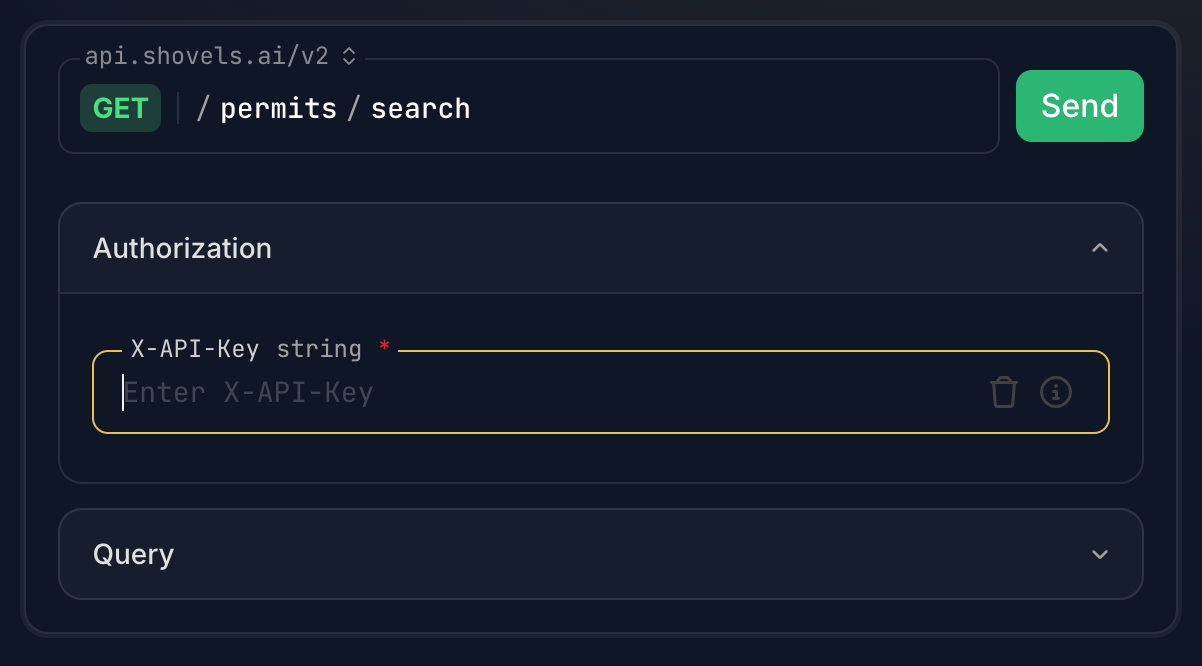 If you have forgotten your API key, or need one in the first place, this is available in your [Profile Settings > API Key](https://app.shovels.ai/profile-settings).
### Server
Ensure that the "Server" drop down is set to `api.shovels.ai/v2`.
### Required fields
Different endpoints will have different required fields. Select the "Query" dropdown to see all available fields. Required fields are indicated with a red asterisk (as shown below).
If you have forgotten your API key, or need one in the first place, this is available in your [Profile Settings > API Key](https://app.shovels.ai/profile-settings).
### Server
Ensure that the "Server" drop down is set to `api.shovels.ai/v2`.
### Required fields
Different endpoints will have different required fields. Select the "Query" dropdown to see all available fields. Required fields are indicated with a red asterisk (as shown below).
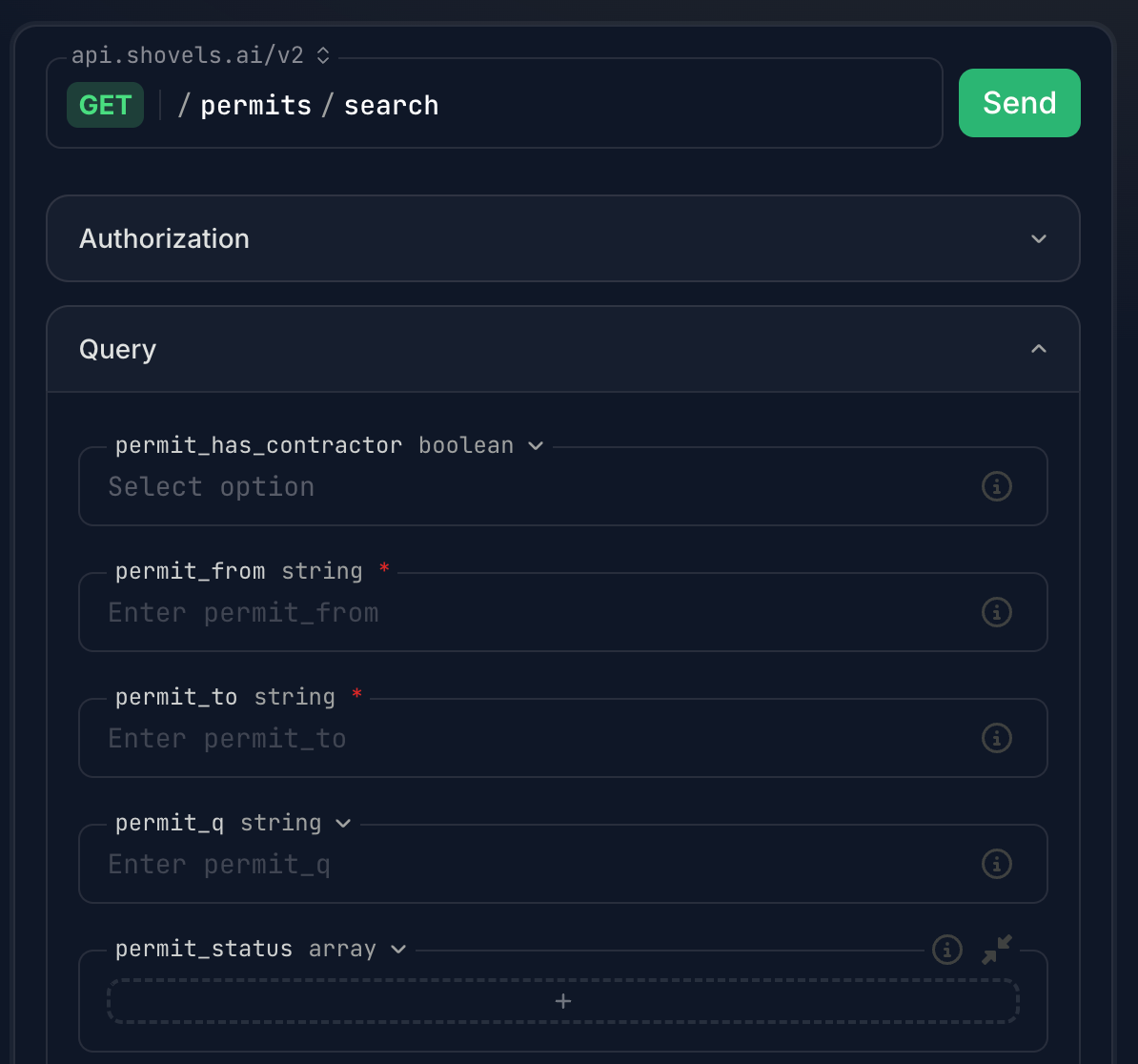 Generally speaking, the required fields are the start and end dates for the query, and the corresponding `geo_id` to point the query to the right place. If the query is for a specific object, like an individual permit, address, or contractor, then you'll only need the corresponding `id` field.
### Parameters
In order to fine-tune your query results, you can add parameters to the request.
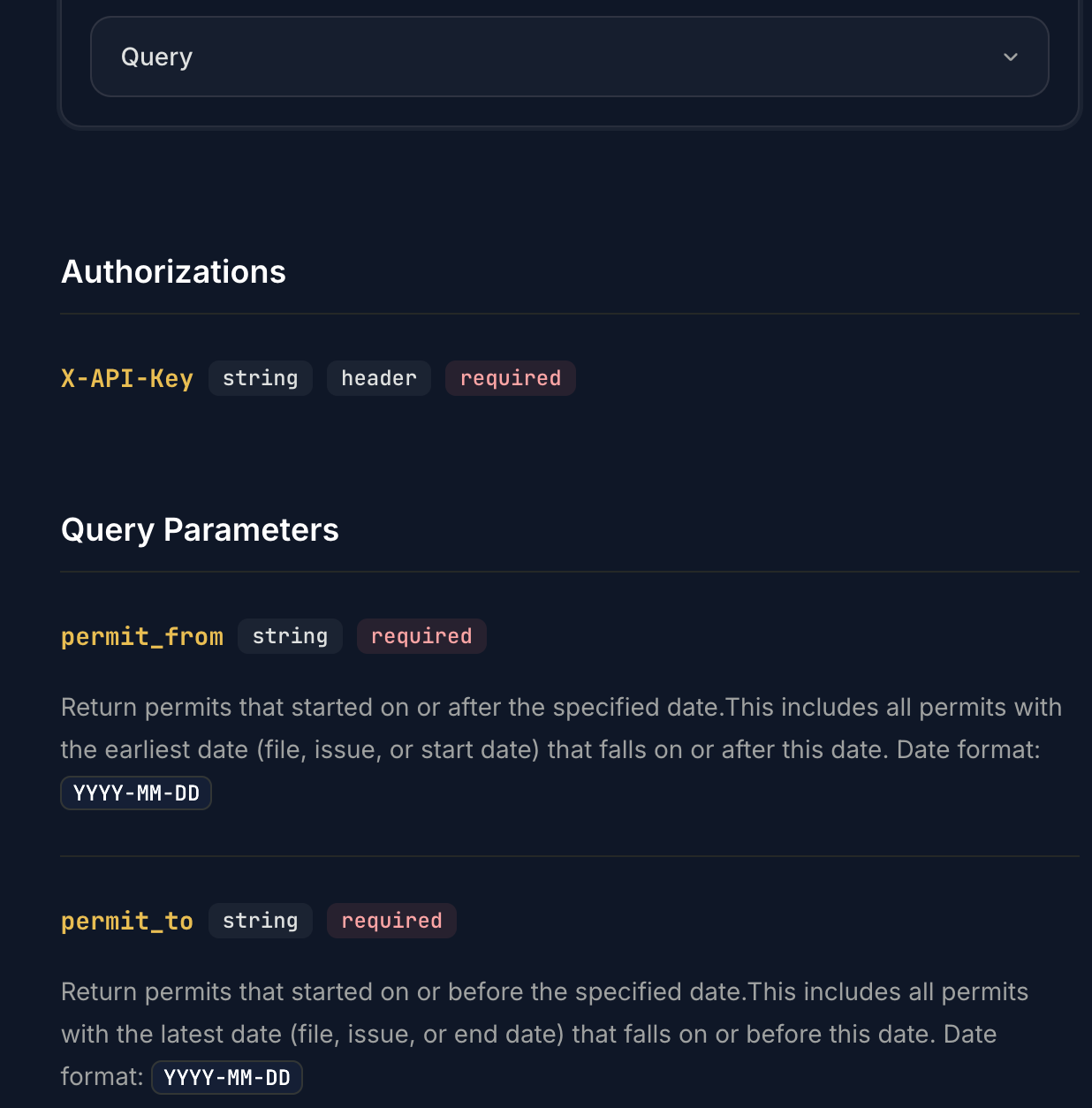
A full list of the parameters available (with definitions) for each endpoint can be found in the "Query Parameters" section, beneath the "Query Dropdown" (as shown below).
Generally speaking, the required fields are the start and end dates for the query, and the corresponding `geo_id` to point the query to the right place. If the query is for a specific object, like an individual permit, address, or contractor, then you'll only need the corresponding `id` field.
### Parameters
In order to fine-tune your query results, you can add parameters to the request.
A full list of the parameters available (with definitions) for each endpoint can be found in the "Query Parameters" section, beneath the "Query Dropdown" (as shown below).
 ## Tips and Tricks
Using a REST API is generally the same everywhere, but here are a few things that may help you with our Shovels API specifically.
### Use Optional Parameters
Permit data goes deep, and our data-cleaning allows you to go even deeper.
Read through all the options in the "Query Parameters" and see if there are any that will help narrow down your query. Not every parameter will have complete fill rates (as in, that field may be null), but it's best to take a bottom-up approach of creating as fine and detailed a query as possible, with all the extra data points you could be interested in.
If that specific query doesn't return the results you need, in either quality or quantity, then you can slowly whittle away at these extra parameters until you get what you need.
### Break Down Your Queries
Our endpoints are answers to straightforward questions, and sometimes the query you may want to build isn't possible with a single endpoint.
In such cases, a sequential approach of chaining endpoint queries together can be effective. In others, where the required field is a value, like a specific `contractor_id` or `address_id`, then it's mandatory to first retrieve the foundational data point before getting the insights for it.
An example of this can be found in our Tutorial section.
### Use the API Request Examples
If you're new to using REST APIs, or even if you're a seasoned veteran, it can be helpful to see an example of the exact syntax and formatting of the request, to give you the piece of mind that it's formatted correctly.
To the right of each endpoint in our API Playground there is a request example in a variety of languages. These will either give you a good starting point for building your own request, or can be directly copy and pasted in simple use cases.
## Error Handling
Proper error messages and HTTP codes are provided to help you troubleshoot issues effectively. Refer to the [Response Types](#response-types) section for an overview of HTTP error codes and how to handle them. Below we describe how to interpret HTTP 422 code.
### 422 Unprocessable Entity
A 422 Unprocessable Entity response occurs when the server understands the request but cannot process it due to invalid data. This helps you identify issues with your input.
The response includes:
* **loc**: The location of the error. The first value indicates the location and the second specifies the problematic field. Common values for the first value include:
* `body`: The error is in the request body.
* `query`: The error is in the query parameters.
* `path`: The error is in the URL path.
* `header`: The error is in the request headers.
* **msg**: A message describing the error.
* **type**: The type of error.
Here are some examples:
```json Request Body Error theme={null}
{
"loc": ["body", "start_date"],
"msg": "Field required",
"type": "value_error.missing"
}
```
```json Query Parameter Error theme={null}
{
"loc": ["query", "size"],
"msg": "Input should be a valid integer",
"type": "int_parsing"
}
```
```json Path Parameter Error theme={null}
{
"loc": ["path", "contractor_id"],
"msg": "Invalid ID format",
"type": "value_error.invalid_id"
}
```
```json Header Error theme={null}
{
"loc": ["header", "X-API-Key"],
"msg": "API key is missing",
"type": "value_error.missing"
}
```
If these examples don't help, please reach out to [Support](mailto:support@shovels.ai) for assistance.
## Troubleshooting
We will outline below a few of the main methodologies for analyzing what happened to a REST API request, and what to do from there.
### Missing Data and Empty Fields
A common thought after receiving a `404` error is to wonder if the query itself was incorrect, or somehow misconfigured.
While that may be the case, it's also important to consider that there may be no data available at this time.
We talk about this in much more detail under the Shovels Foundations section, but to be succinct: there are many complications in obtaining complete and total permit data, from variability in digitization practices to required permit fields in individual jurisdictions. While we do our best, we aren't there yet.
**If you find that we're missing key data for your needs, please reach out to [Support](mailto:support@shovels.ai) and we'll confirm for you whether we have it or not, and if not, add it to our roadmap to get it soon.**
### Release Notes
Another possibility, especially for existing queries that failed, are that the endpoints and data structure may have changed.
Any such changes are documented in our [Release Notes](/release-notes).
Please note that such breaking changes are exceedingly rare, and we do our best to minimize them wherever possible. If you need any assistance, or notice that existing queries are suddenly failing, please reach out to [Support](mailto:support@shovels.ai) for assistance.
If you have any questions, please don't hesitate to reach out to [Support](mailto:support@shovels.ai).
## Tips and Tricks
Using a REST API is generally the same everywhere, but here are a few things that may help you with our Shovels API specifically.
### Use Optional Parameters
Permit data goes deep, and our data-cleaning allows you to go even deeper.
Read through all the options in the "Query Parameters" and see if there are any that will help narrow down your query. Not every parameter will have complete fill rates (as in, that field may be null), but it's best to take a bottom-up approach of creating as fine and detailed a query as possible, with all the extra data points you could be interested in.
If that specific query doesn't return the results you need, in either quality or quantity, then you can slowly whittle away at these extra parameters until you get what you need.
### Break Down Your Queries
Our endpoints are answers to straightforward questions, and sometimes the query you may want to build isn't possible with a single endpoint.
In such cases, a sequential approach of chaining endpoint queries together can be effective. In others, where the required field is a value, like a specific `contractor_id` or `address_id`, then it's mandatory to first retrieve the foundational data point before getting the insights for it.
An example of this can be found in our Tutorial section.
### Use the API Request Examples
If you're new to using REST APIs, or even if you're a seasoned veteran, it can be helpful to see an example of the exact syntax and formatting of the request, to give you the piece of mind that it's formatted correctly.
To the right of each endpoint in our API Playground there is a request example in a variety of languages. These will either give you a good starting point for building your own request, or can be directly copy and pasted in simple use cases.
## Error Handling
Proper error messages and HTTP codes are provided to help you troubleshoot issues effectively. Refer to the [Response Types](#response-types) section for an overview of HTTP error codes and how to handle them. Below we describe how to interpret HTTP 422 code.
### 422 Unprocessable Entity
A 422 Unprocessable Entity response occurs when the server understands the request but cannot process it due to invalid data. This helps you identify issues with your input.
The response includes:
* **loc**: The location of the error. The first value indicates the location and the second specifies the problematic field. Common values for the first value include:
* `body`: The error is in the request body.
* `query`: The error is in the query parameters.
* `path`: The error is in the URL path.
* `header`: The error is in the request headers.
* **msg**: A message describing the error.
* **type**: The type of error.
Here are some examples:
```json Request Body Error theme={null}
{
"loc": ["body", "start_date"],
"msg": "Field required",
"type": "value_error.missing"
}
```
```json Query Parameter Error theme={null}
{
"loc": ["query", "size"],
"msg": "Input should be a valid integer",
"type": "int_parsing"
}
```
```json Path Parameter Error theme={null}
{
"loc": ["path", "contractor_id"],
"msg": "Invalid ID format",
"type": "value_error.invalid_id"
}
```
```json Header Error theme={null}
{
"loc": ["header", "X-API-Key"],
"msg": "API key is missing",
"type": "value_error.missing"
}
```
If these examples don't help, please reach out to [Support](mailto:support@shovels.ai) for assistance.
## Troubleshooting
We will outline below a few of the main methodologies for analyzing what happened to a REST API request, and what to do from there.
### Missing Data and Empty Fields
A common thought after receiving a `404` error is to wonder if the query itself was incorrect, or somehow misconfigured.
While that may be the case, it's also important to consider that there may be no data available at this time.
We talk about this in much more detail under the Shovels Foundations section, but to be succinct: there are many complications in obtaining complete and total permit data, from variability in digitization practices to required permit fields in individual jurisdictions. While we do our best, we aren't there yet.
**If you find that we're missing key data for your needs, please reach out to [Support](mailto:support@shovels.ai) and we'll confirm for you whether we have it or not, and if not, add it to our roadmap to get it soon.**
### Release Notes
Another possibility, especially for existing queries that failed, are that the endpoints and data structure may have changed.
Any such changes are documented in our [Release Notes](/release-notes).
Please note that such breaking changes are exceedingly rare, and we do our best to minimize them wherever possible. If you need any assistance, or notice that existing queries are suddenly failing, please reach out to [Support](mailto:support@shovels.ai) for assistance.
If you have any questions, please don't hesitate to reach out to [Support](mailto:support@shovels.ai).